
Introduction
Applied Compute builds Specific Intelligence for enterprises: AI systems trained on the institutional knowledge that makes their business unique. Specific Intelligence lives in two places: the weights of an LLM, and the context exposed to an agent at runtime.
For the weights side, we run targeted RL over high-quality, integrated environments, among other techniques. We've written about this with DoorDash⌝, Cognition⌝, and Mercor⌝.
Today we focus on the context side: how we create Contextbases that encode the nuance behind an enterprise's tasks, preferences, and procedures.
We cover three topics: the architecture, benchmark results on enterprise tasks, and our most actionable finding — that context amortizes reasoning costs across agent runs.
Most enterprise teams evaluating agents face the same tradeoff: higher reasoning effort produces better outputs, but drives up cost and increases latency. We show that using our Context Engine, we can shift where the tradeoff sits. An agent with access to a Contextbase at low reasoning effort matches medium reasoning without, and at fixed reasoning we see up to 16.9% relative improvement on APEX-Agents⌝ and consistent gains on GDPVal⌝. The Contextbase is built once and used on every rollout, which at scale is the difference between an agent too expensive to run on every ticket and one cheap enough to run on all of them.
Applied Compute Context Engine Architecture
The Context Engine is built around three systems:
- Remember ingests raw resources from a wide range of SaaS connectors (e.g. S3, Azure, Google Drive, Github) and most importantly, agent traces from Applied Compute Agent Cloud or a third-party SDK.
- Refine runs an always-on swarm of context curation agents that process new sources, extract concept links, resolve conflicting information, and prepare indexes for retrieval. These refinery steps iteratively combine new data ingested from Remember with the existing Contextbase from prior Refine passes, keeping the Contextbase thorough and up-to-date.
- Retrieve is a set of APIs your agent calls at runtime to search the Contextbase
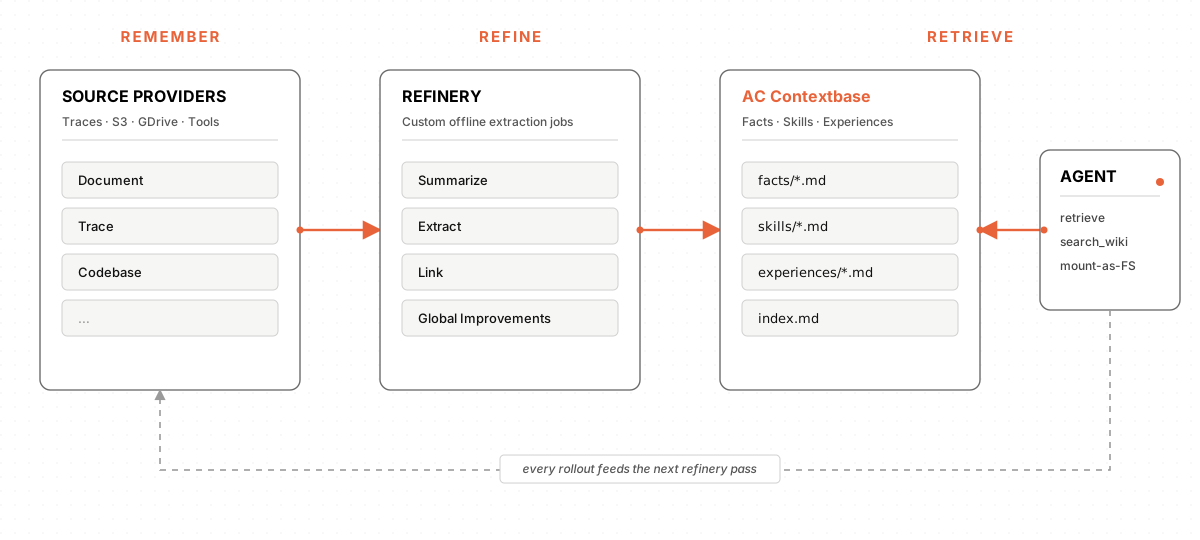
A common concern from enterprise teams is the cold-start problem: how does a context system get off the ground before the agent has produced a single production trace? The Context Engine is designed so that deployment can begin before the agent has run a single rollout.
Here is what an enterprise typically provides on day zero:
- Existing documentation: SOPs, internal wikis, runbooks, onboarding docs.
- Completed work: ticket histories, completed deliverables, codebases, exemplars of the task done well by a subject matter expert.
- Secondary data: product logs, databases, meeting notes, emails, and any other data produced as a byproduct of work.
Remember ingests these sources directly, without requiring teams to migrate data into a new system. Refine then runs an initial pass to extract facts (what does "good" look like at this company), skills (how does this team approach this class of problem), and any episodes that can be reconstructed from prior work.
The integration points are designed to fit into existing enterprise tooling rather than replace it:
- Cloud storage: S3, Google Drive, SharePoint, Snowflake, Databricks, etc.
- Code hosts: GitHub, GitLab, etc.
- Agent runtimes: any system that can post traces to the Remember API, including agents hosted on your own system
Once the agent is in production, every rollout becomes a candidate for the next refinery pass. The pipeline reads new traces, updates the Contextbase, and serves richer context to the next agent interaction.
Why This Architecture
Remember, Refine, and Retrieve give us three valuable properties:
- Cold-start: a capable agent on day one, using only existing documentation and prior human attempts.
- Continual learning: traces from the deployed agent feed back into the Refinery pipeline, improving performance with zero human intervention and adapting to changing tasks.
- Human feedback as a key signal: subject matter experts can accept or reject changes to the Contextbase, and dedicated Refine jobs can incorporate explicit human feedback.
Hill-Climbing Enterprise Benchmarks (Apex / GDPVal)
We applied the Context Engine to build pipelines for two external knowledge work benchmarks:
- APEX-Agents⌝ (Mercor): tests whether AI agents can complete long-horizon, cross-application professional tasks in investment banking, consulting, and corporate law.
- GDPVal⌝ (OpenAI): measures AI performance on real-world economically valuable deliverables across 44 occupations in the top 9 sectors of U.S. GDP.
Setup: We partition tasks into a disjoint train/eval split evenly across worlds (APEX) or sectors (GDPVal). We then call the Remember APIs on a set of "memory-building traces" for each world or sector (simulated by three rollout traces across each sample in the train set) and run our Refinery process, which includes a step to summarize each rollout and then a follow-up step to extract key procedures and facts. Finally, we compare three methods:
- Baseline: an agent with access to a
bashtool* - Prior traces: the baseline agent with the “context-building traces” from different tasks within the same world as the target task mounted to the world’s filesystem (with appropriate changes to the system prompt).
- AC Contextbase: the baseline agent with the Contextbase constructed from our Refinery process, similarly mounted to a filesystem.
*A simple bash agent loop was an extremely performant harness for APEX-Agents and GDPVal. Additionally, this allows us to keep the harness constant while running context experiments.
For scoring, we compute mean score@3 for each task across GPT-5.4 (medium) and GPT-5.4-mini (medium).
APEX-Agents Results
Overall our eval task count for APEX-Agents was 71 (Law) + 68 (IB) + 69 (Consulting) = 208 tasks for both models. The results are clear: the Contextbase is helpful across subjects!
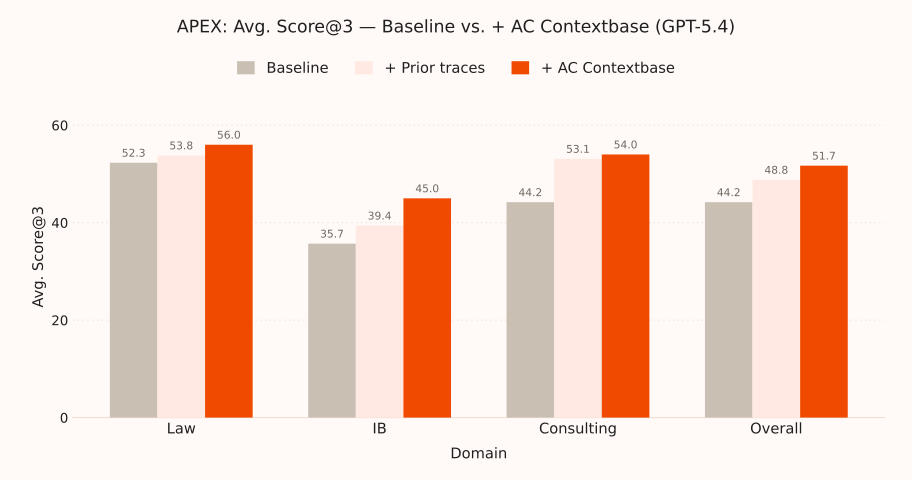
Compared to baselines, we see that GPT-5.4 (medium) improves performance overall from 44.2% mean score@3 to 51.7% which is an absolute improvement of 7.5% and relative improvement of 16.9%. For GPT-5.4-mini (medium), we see performance overall go from 33.4% mean score@3 to 38.7% which is an absolute improvement of 5.2% and relative improvement of 15.8% .
The one-time cost of creating a Contextbase improved both the larger GPT-5.4 and smaller **GPT-5.4-mini. As to how the information was actually used, we inspected traces and found a few qualitative categories:
World learning: The Contextbase gave future rollouts some clear pointers to how the world was structured and where it could find key information within dense excel files: especially for investment banking and consulting.
…
Cross-company benchmark authority/filesystem/4. Received From Client/Impact Therapeutics/
- Client P&L and site-specific operational files.
- Important site subfolders recur:
Darcylis Site/,Lorexa Site/,Papinex 9 Site/,Strevalent 20 Site/.
…
Interpreting SG&A data
I'm looking to interpret the SG&A file, focusing on categories like Sales & Marketing, General & Administration, Total SG&A, and possibly “SG&A % of revenue.” I'll compare the CAGR trends for the years 2020–22 and 2022–24. I think there are rows for each company within these categories covering 2020-2024. My goal is to calculate the CAGR for both periods and determine the category with the largest absolute difference in percentage points. I'll need to inspect the SG&A sheet beyond row 14.
Clarifying SG&A Analysis
The user wants detailed SG&A category breakdowns, which means I should look at specific workbook rows for each category. I need to compare the CAGRs for the periods 2020–2022 and 2022–2024 for those categories, calculating the percentage point change in CAGR. I'll consider using separate SG&A files per company, identify the top three categories, and compute the CAGR for each category. Finally, I’ll find the largest absolute difference in changes and average across competitors. Analyzing CAGR Trends
Tools: The Contextbase extracted key best practices around tooling such as certain python functions and how they interacted with excel spreadsheets.
4) Do not count on Excel recalculation
Because libreoffice/soffice is absent and openpyxl does not recalc, the winning strategy is usually:
- extract cached base values,
- manually recompute only the scenario-dependent lines,
- write the final outputs as literal numbers into a new sheet or summary block.
This was the exact successful approach in the v07 ad-fund IRR task, the v06 ATP matrix task, and the v06 opex sensitivity task [rollout d593c43c, turns 32-38]; [rollout f28b4aef, turns 9-11]; [rollout 28a96735, turns 27-34].
Procedures: The Contextbase provided examples and structure for executing workflows, such as for nuanced DCF modeling and LBO-related analysis
How to handle PLTF LBO model tasks
Use this for tasks touching PLTF_LBO_v06.xlsx, PLTF_LBO_v07.xlsx, or PLTF_LBO_v08.xlsx.
1) Identify the exact workbook version first
Do not assume the file sits in the same directory every time.
- v06 usually lives at
/filesystem/3. LBO Model/PLTF_LBO_v06.xlsx - v07 appeared at
/filesystem/PLTF_LBO_v07.xlsx - v08 appeared at
/filesystem/PLTF_LBO_v08.xlsx
Version-specific quirks materially changed answers; see facts-pltf-model-bugs.md.
2) Read the model in two passes
- Use
openpyxl.load_workbook(path, data_only=True)for cached values. - Use
openpyxl.load_workbook(path, data_only=False)for formulas, row locations, and sheet structure.
This was the stable pattern across successful rollouts [rollout d593c43c, turns 3-8]; [rollout f28b4aef, turn 9].
3) Locate the answer block before changing anything
Typical places:
Copy of LBO!K157:K174for exit / equity / IRR- rows
194:212for ATP logic in v06 Assumptionsinterleaved quarter blocks for scenario inputsIncome Statement/Balance Sheetfor supporting anchors
Use facts-pltf-model-layout.md as the map.
4) Do not count on Excel recalculation
Because libreoffice/soffice is absent and openpyxl does not recalc, the winning strategy is usually:
- extract cached base values,
- manually recompute only the scenario-dependent lines,
- write the final outputs as literal numbers into a new sheet or summary block.
This was the exact successful approach in the v07 ad-fund IRR task, the v06 ATP matrix task, and the v06 opex sensitivity task [rollout d593c43c, turns 32-38]; [rollout f28b4aef, turns 9-11]; [rollout 28a96735, turns 27-34].
5) Reproduce the workbook's own logic, even if it looks ugly
Before "fixing" anything, check facts-pltf-model-bugs.md. Three recurring traps:
- v08 ATP cached deleveraging is stale, so naive use of
K227/K228understates premiumtask_01da0d93b3ad4487.md. - v06 ATP logic effectively uses
equity_exit = ev_exit + K160, notEV - net debttask_658948aa7e6a4ad8.md. - v06 PPA task wanted buggy
K15purchase equity, not a corrected purchase pricetask_ffb8c59f52344a94.md.
6) Preserve prompt-specific fixed lines when traces show they matter
Example: in the opex sensitivity task, exact outputs required keeping cached taxes G68:K68 fixed; recomputing tax created failing near-misses [rollout 1f379ce8, turn 42]; [rollout aee89ae8, turn 46].
General rule: if prior traces show a particular cached row was held fixed in the winning solution, treat that as authoritative for this world.
7) If the task requires an artifact, prefer a copied workbook
Safest pattern:
- copy source workbook,
- add a clearly named sheet,
- write literal final results,
- save under a new filename in
/filesystem.
That passed for PLTF_LBO_v06_Advent_ATP.xlsx [rollout f28b4aef, turn 11].
8) Final response shape
- Lead with the created file path if applicable.
- State the exact requested metrics in a simple bullet list or table.
- Use the grader's rounding exactly.
- Do not add alternative interpretations unless the prompt explicitly demands them.
GDPVal Results
We filter out samples that are not solvable using just bash as a tool. This leaves us with 98 ”context building” tasks and 89 eval tasks split evenly across all sectors.
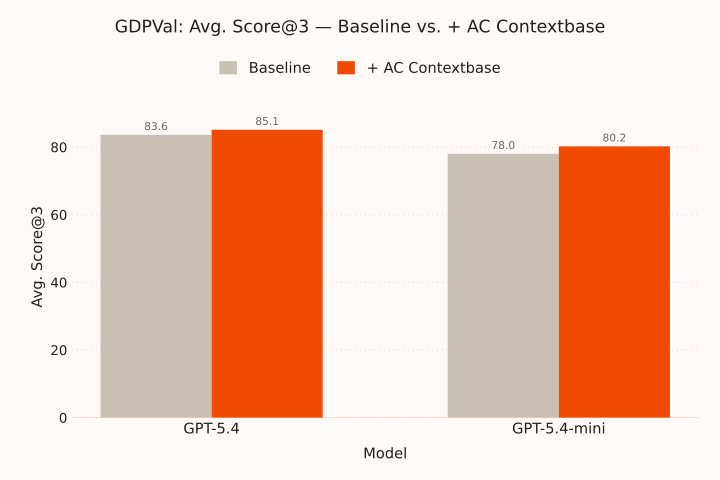
Gains on GDPVal are more modest. Compared to baselines, we find that GPT-5.4 (medium) improves performance overall from 83.6% mean score@3 to 85.1% and for GPT-5.4-mini (medium) we see performance overall go from 78.0% mean score@3 to 80.2%.
We hypothesize that these gains are more moderate due to:
- Less re-usable structure (entirely new file resources) between new tasks
- Weaker overlap between memory-building and eval tasks, even within sector, based on qualitative reads of traces and memories
- Less headroom for improvement due to models already being close to their performance ceiling at baseline
Reasoning-Effort Amortization
The single most actionable result in this post is that context amortizes reasoning costs.
We re-ran the APEX-Agents and GDPVal experiments while varying reasoning effort across models. The result, in plain terms: a model with AC Contextbase at low reasoning effort matches the same model without memory at medium reasoning effort.
This matters because reasoning effort is the single biggest knob enterprises have on agent latency and cost when dealing with state of the art models. The standard tradeoff is: pay more for higher reasoning, get better results. AC Contextbase shifts that curve. We can actually improve the pareto frontier through offline learning!
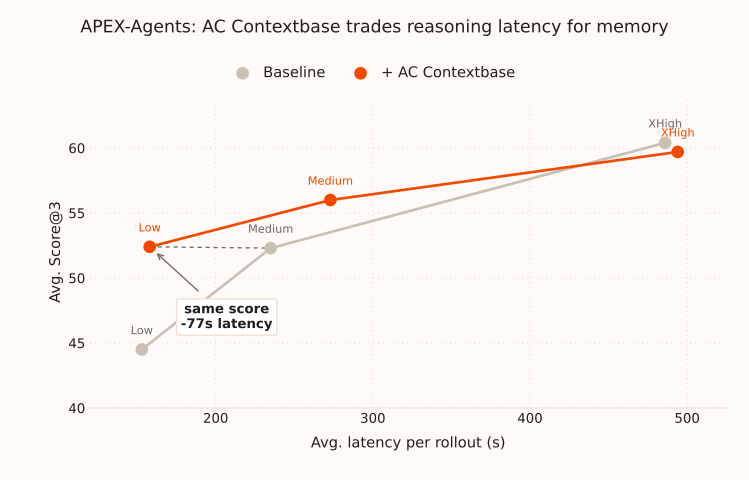
We see that as you decrease reasoning budget (and costs), the lift from Contextbase increases:
- GPT-5.4 (low): +7.9% (from 44.5% → 52.4%)
- GPT-5.4 (medium): +3.7% (from 52.3% → 56.0%)
- GPT-5.4 (xhigh): -0.7% (from 60.4% → 59.7%)
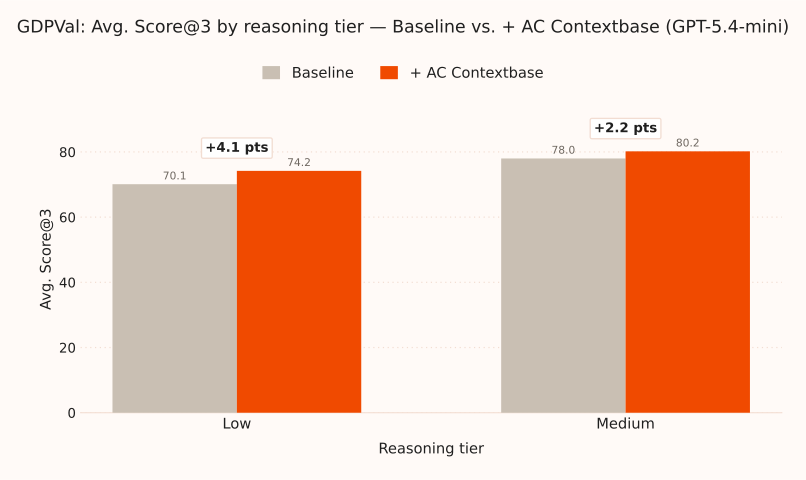
Reasoning-effort amortization is replicated. On GPT-5.4-mini the result around reasoning-effort amortization holds on GDPVal as well. Mini's lift roughly doubles when reasoning drops from medium to low — the same direction as APEX-Agents. For full GPT-5.4, we saw no improvement from memory at any reasoning level due to task saturation.
Why Knowledge Work Context is Hard to Build
Coding agents are remarkably effective at utilizing context gathered from the codebase. The same isn't true for general knowledge work.
This is due to three structural gaps:
- Code is centralized in version control systems, knowledge work is scattered. With sufficient reasoning effort, “how the code works” can always be gleaned from the code itself; everything can be traced to its definition. For general knowledge work, critical information is often scattered without clear links.
- Code ships with a complete dependency tree, knowledge work context is hidden. Because it has to run, code must inherently contain all its dependencies. In most other domains, key information is not even written down anywhere and only lives in experts’ heads.
- Code forces resolution of merge conflicts, knowledge documentation diverges. Because only the primary branch gets deployed, developers must reckon with and resolve conflicts in order to progress state forwards. Outside of code, internal documents are often littered with outdated or incorrect information that are challenging to reason about.
Context Engine aims to close all three gaps for general knowledge work in enterprises.
To effectively embark on this transition, we deploy a swarm of agents with Refinery. Each agent in the swarm is specialized to its job: lightweight agents tag documents/traces as they come in, slower agents built on more powerful teacher models run infrequently to handle the highest-stakes synthesis. The output is Contextbase — a living encoding of institutional knowledge that lets knowledge work agents perform their best work.
Why This Matters for Enterprise Deployment
Applied Compute's mission is to help enterprises build their own Specific Intelligence. Previously we have focused on weights, but they are only part of the story. RL teaches a model how to do a task, but it can't tell the model what your company knows, prefers, or has recently decided. Today we introduced the other piece of our platform.
The AC Context Engine powers the continuous distillation of an enterprise's tasks, preferences, and procedures into a live context database that travels with their agents.
The concrete results:
- Reasoning-effort amortization: low reasoning with a ContextBase match a normal agent with medium reasoning, which directly translates to lower production cost.
- Benchmark performance: up to 16.9% relative improvement on APEX-Agents and consistent gains on GDPVal.
At scale, this enables critical unlocks for enterprises. While pilot deployments tolerate higher per-rollout costs and latency because absolute volume is small, production deployments do not. AC Context Engine's role is to shift cost out of the per-rollout column and into a periodic line item that scales cleanly as agent fleets grow. The same Remember, Refine, Retrieve pipeline supports both findings. Enterprises bring their existing documentation, code, and traces. We build the Contextbase on top.
Next week we'll share results from running the Context Engine on our own internal coding workflows.
If you are an enterprise looking to turn your production traces into a proprietary advantage, reach out.